![logo-black-tangible_growth 1-1.png]](https://support.tangible-growth.com/hs-fs/hubfs/logo-black-tangible_growth%201-1.png?height=23&name=logo-black-tangible_growth%201-1.png)
WHAT'S NEW
In the Dec 2025 release of Tangible Growth, we introduce Related Items enhancement:
- Prominent placement – Related items now appear directly below the description, always visible
- Directionality – Specify whether something delivers to or depends on another item
- Relationship types – Choose from actions, dependencies, or general relationships
- Quick actions – "Add action" and "Add dependency" buttons for the most common use cases
- Two-way awareness – When you link items, both sides show the relationship
WHERE TO FIND RELATED ITEMS
When you open an Objective, Key Result, Commitment, or Interlock, you'll see the Related Items section directly in the main view.
The layout shows:
Objective Title
Description text...
Measured by (If Objective)
Key Result: [Key Result 1] [Key Result 2]
Strategic Alignment (If Objective or Key Result)
This aligns to: [Parent Objective]
This is supported by: [Other supporting Objective]
Related Items
This is delivered by: [Commitment A]
This depends on: [Commitment B]
+ Add item

RELATIONSHIP TYPES
Actions (Delivers)
Use actions when one item produces an output for another.
Incoming: "Add action (This is delivered by)"
Example: A Key Result is delivered by Commitments
Outgoing: "This delivers"
Example: A commitment delivers an objective
Dependencies (Depends On)
Use dependencies when one item requires another to be completed first. This works well with commitments for internal dependencies, or interlocks for cross-team dependencies.
Outgoing: "This depends on"
Example: A feature depends on infrastructure work
Incoming: "This is required for"
Example: Infrastructure is required for a feature
Related To
Use for general connections without a specific direction.
Bidirectional: "This is related to"
Example: Two initiatives that share context
ADDING RELATIONSHIPS
Quick Add: Actions and Dependencies
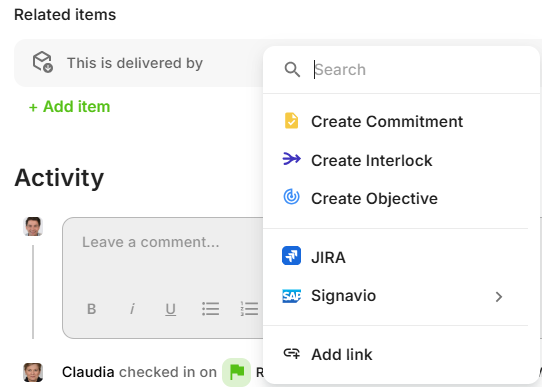
Click "+ Add item" to open the menu:
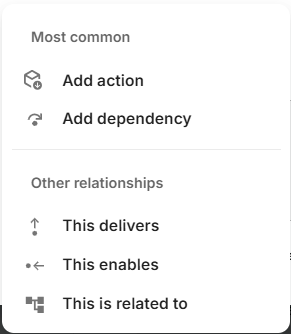
After Selecting a Relationship Type choose what to link to:
- Search existing – Find an existing Objective, Key Result, Commitment, or Interlock
- Create new – Create a new objective, commitment, or interlock and link it
- (IN THE FUTURE): Select and add link to integrated systems
- Add link: to any external system
UNDERSTANDING THE DISPLAY
You'll see automatic alignment relationships:
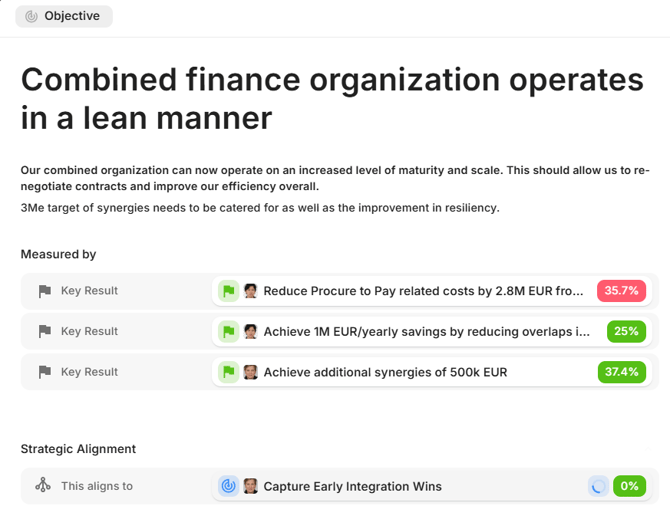
For Objectives:
Measured by
- Key Result – Key results that measure this objective
Strategic Alignment
- This aligns to – This objective supports another objective
- This is supported by – This is supported by another objective
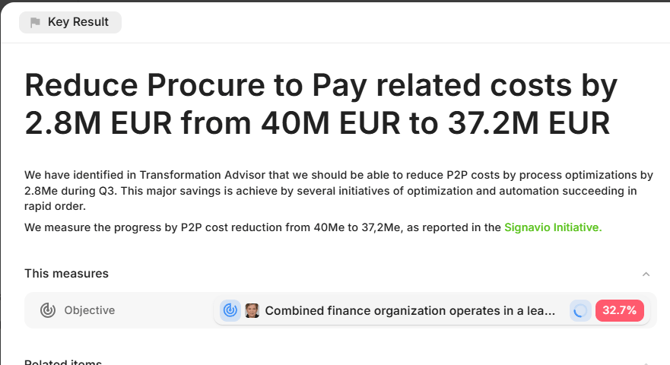
For Key Results:
This measures
- Objective – The objective this key result supports
For all items:
Related Items
- Actions (delivers relationships)
- This is delivered by -> X <- This delivers
- Dependencies
- This depends on -> X <-This is required for
- General relationships
- This is related to X
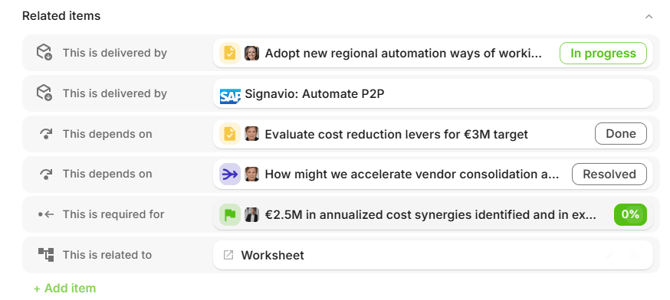
Visual Indicators
Each relationship shows:
- An icon indicating the relationship type and direction
- The relationship label (e.g., "This depends on")
- A chip showing the linked item with its status
- A remove button (×) if you have edit access
REMOVING RELATIONSHIPS
- Find the relationship in the Related Items section
- Click the × button next to it
- The relationship is removed from both items
COMMON PATTERNS
Objective with Key Results and Actions
- Objective: Improve customer satisfaction
- Measured by
- Key Result: Reduce response time from 4h to 1h
- Key Result: Increase NPS score from 45 to 70
- Measured by
- Key Result: Reduce average response time from 4h to 1h
- This measures:
- Objective: Improve customer satisfaction
- Related Items
- This is delivered by: Hire 2 support staff (Commitment)
- This is delivered by: Deploy chatbot for common questions (Commitment)
- This measures:
- Key Result: Increase NPS score from 45 to 70
- This measures:
- Objective: Improve customer satisfaction
- Related Items
- This is delivered by: Implement survey automation (Commitment)
- This is delivered by: Launch feedback portal (Commitment)
- Related Items
- Objective: Improve customer satisfaction
- This measures:
Commitment with Dependencies
Commitment: Launch feedback portal- Related Items
- This delivers: Increase NPS score from 45 to 70
- This depends on: Design approval by Jan 10th
- This depends on: Feedback API ready by Feb 20th
Cross-Team Dependencies
When Team A needs something from Team B, you can link to Commitments or Interlocks:
Team A's view:
Build personalization feature
This depends on: Build Recommendation engine (Contributor: Team B)
Team B's view:
Build Recommendation engine
This is required for: Build personalization feature (Contributor: Team A)
Both teams see the dependency from their perspective.
Tip: For formal unclear cross-team dependencies, consider creating an interlock and linking to it. This gives both teams visibility and a clear place to track resolution.
BEST PRACTICES
Use "Add action" for Deliverables
When commitments or work items contribute to an objective, use "Add action" on the objective to show what delivers it.
Use "Add dependency" for Blockers
When your work requires something else first, use "Add dependency" to make blockers visible.
Be Specific About Direction
Instead of generic "related to" links, choose:
- Add action – for outputs and results
- Add dependency – for blockers and prerequisites
This makes dependencies visible and actionable.
Surface Dependencies Early
When you identify a dependency:
- Add the relationship immediately, add the teams/people as Contributors/Participants
- Both teams and all people will see it
- Discuss and plan accordingly
FREQUENTLY ASKED QUESTIONS
Who can add or remove relationships?
- Anyone with edit access to an item can manage its relationships. You need edit permission on the item you're linking from.
What happens when I delete an item with relationships?
- The relationships are automatically removed. Items that were linked will no longer show the connection.
Can I link to items from other teams?
- Related items work across teams. This is especially useful for cross-team dependencies.
Do relationships affect status or progress?
- Relationships are informational – they help visualize connections but don't automatically change statuses. Use them to understand impact and coordinate work.
What's the difference between alignment and related items?
- Strategic Alignment shows the OKR structure – how objectives relate to key results and parent objectives. This is managed through the normal OKR hierarchy.
- Related Items shows additional connections – actions, dependencies, and other relationships you explicitly create.