![logo-black-tangible_growth 1-1.png]](https://support.tangible-growth.com/hs-fs/hubfs/logo-black-tangible_growth%201-1.png?height=23&name=logo-black-tangible_growth%201-1.png)
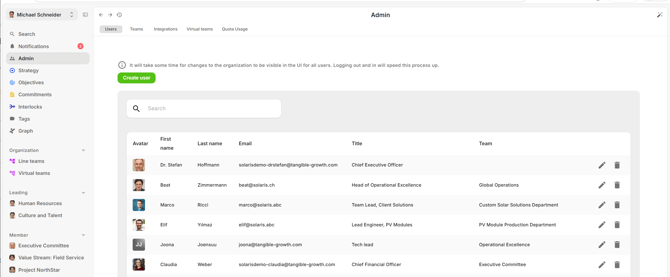
To change the permission level of a user, please navigate to the Admin section of TG.
-
There under "Users", search for the user who you want to change.
-
Open the user account by selecting the pen in the right side of the table.
- Add Administrator or Change Manager rights as necessary
- Administrator can access the Admin section and edit any settings in TG.
- Change Manager can add and modify any content of the teams.
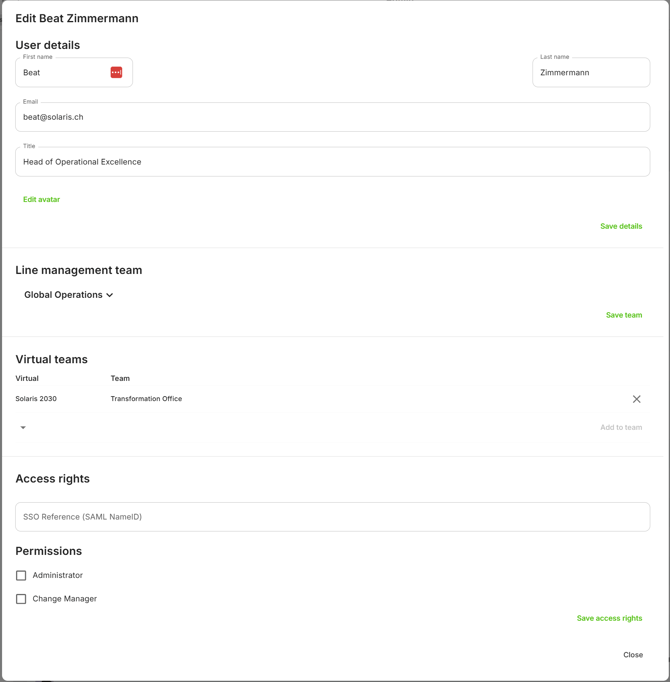
Select "Save access rights" and then Close the dialog.